Compares the measurements
Matches the store’s chart to your measurements instead of trusting the size label alone.
Photograph the garment, and Maqasi tells you in seconds whether it fits you, and why.
3 free analyses • no card required
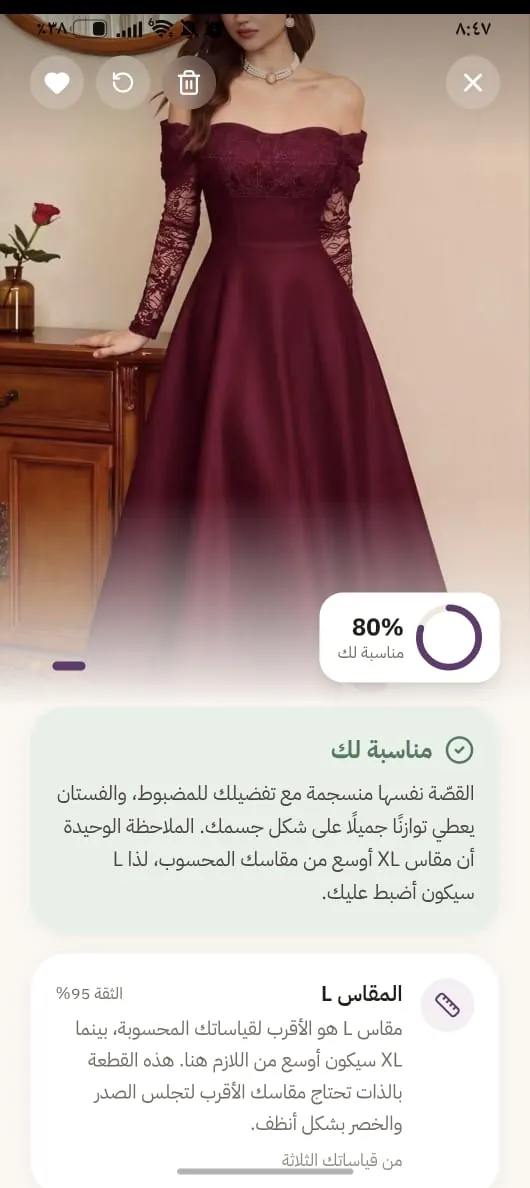
Maqasi gathers the scattered details you normally check yourself — size, fabric, cut — and presents them as one result you can read at a glance.
Matches the store’s chart to your measurements instead of trusting the size label alone.
Reads the fabric composition from the garment label and flags anything that irritates you.
Goes beyond the size to show whether the cut actually suits your shape.
Tell it whether the size was right, and it uses that to recommend more accurately next time.
Women who used Maqasi in their own shopping, on pieces they genuinely hesitated over before buying.
Instead of measuring your body every time, it measures the dress or the trousers using the camera. It saves time and money, and spares you the cost and hassle of returning clothes you bought online.
I add a photo of the dress along with my own measurements, and it gives me a percentage showing how well it suits my body. That made choosing dresses much easier, and I feel reassured that the size and the shape are right for me.
I loved it — it is easy, and I order feeling confident the piece will fit me properly. I think it helps a lot, especially those who are afraid to order from websites; it reassures them.
I tried it more than once on dresses, and the app gave me a full description of the piece and explained the cut and the fabric. That helped me understand it better.
I really loved how simple and easy it is. It is a wonderful, useful idea — we genuinely need an app like this.
A lovely and very useful app, especially now that most of our shopping happens online.
No need to type the garment’s details. Start with what you have and Maqasi arranges the rest.
From the store or your gallery. We need the garment on its own, not a photo of you.
Photograph the store’s own chart so the comparison uses its numbers, not a generic size.
You get the closest size, how well it fits, and notes to help you decide.
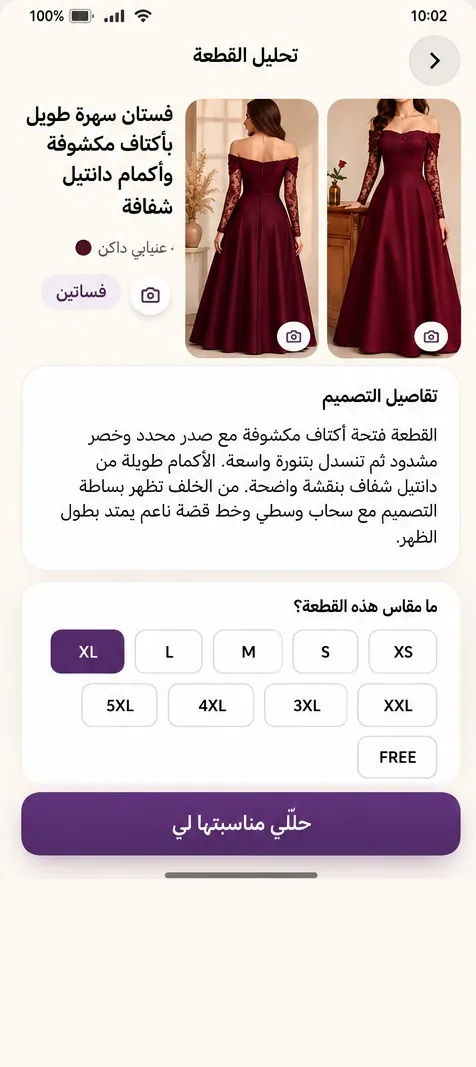
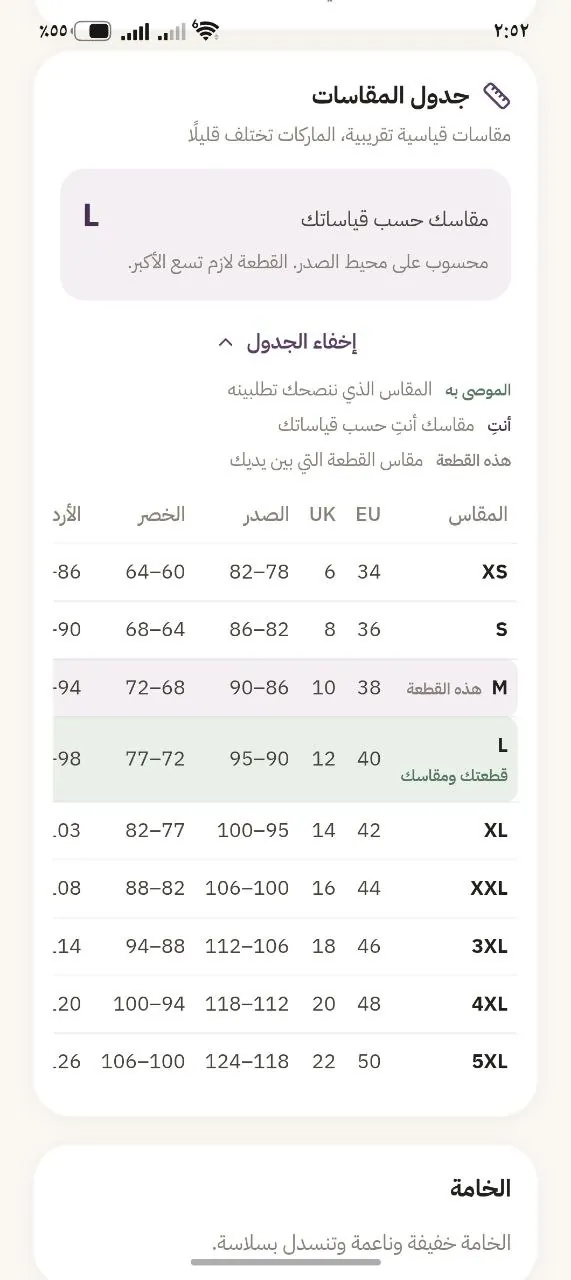

Maqasi does not just name a size; it shows where the garment may work for you and where to pay attention before buying.

Sizes differ from brand to brand. So Maqasi reads the chart for the garment you chose and places your recommended size and measurements beside it, so the comparison is plain to see.
A comparison tied to the storeIt never assumes every M or L means the same thing.

Choosing between fitted, relaxed and true-to-size changes what “the right size” even means. Add the colours you like and the result gets closer to your own style.
As close to your measurements as possible — no extra room, no pull at the shoulders.
Maqasi does not start from scratch each time. Every garment you analyse, and every time you said “it fit” or “it didn’t”, stays with it and shapes what it suggests to you later.
Compare your measurements against the store’s chart, and understand the cut and fabric before you decide.
Did it fit? Did you buy it, or save it to compare? A short step, and the benefit comes back to you.
Your decisions gather in one place, and the next recommendation starts from a deeper read of your taste.
And on the next trip, it picks up where you left off
Your wardrobe is not a photo folder. It is a record of what you saved and what you bought, with each piece’s fit percentage, size and brand, ready for your next trip.

Short answers to what people ask most before trying it.
No. Maqasi only needs photos of the garment, and uses the measurements you enter to judge how well it suits you.
Yes, once. After that Maqasi uses the same measurements for every garment you analyse, and you can edit them at any time.
Photograph the garment label. Maqasi reads the fabric composition printed on it and warns you if it contains a material you previously flagged.
Maqasi can still read the garment and comment on the cut and fit, but the recommended size is more accurate when the store’s chart is added.
Yes. After buying, you tell it whether the size ran true, small or large, and it uses that to learn your taste in fit — so later recommendations get sharper.
“Saved” is for pieces you liked and want to compare or revisit before deciding, and “Purchased” is for pieces you actually own. Both live in your wardrobe, in two separate tabs you can switch between.
Yes. Maqasi analyses the garment from its photo and its store’s chart, so it works with any store or brand — local or international, online or in person.
Your wardrobe and analyses stay in your account. The subscription sets how many new analyses you get, and cancelling does not delete what you already saved.
Photos are used to analyse the garment and to show the result in your wardrobe, and you can delete any analysis or your whole account from settings.
A clear photo, the store’s chart, and your preferences — for a better decision before you buy.
3 free analyses • no card required
You can get the Android app on Google Play now, or use Maqasi in your browser. It works just like the app.
Get it onGoogle Play Try it now
Download the app and analyse your first piece from one photo. Available on Android, with an iPhone version coming soon.
Get it onGoogle Play